GERMANIA WIKI
Auth: ZeBobbel
Node.js v20
<strong>CraftBook</strong> (<strong>FalseBook</strong> is a fork) is a plugin that adds various mechanics, such as elevators, gates, etc., that can be interacted with via signs by right-clicking them (default controls).
This page will document some of the available mechanics (integrated circuits) on AP, though additional documentation is available here: https://craftbook.enginehub.org/en/3.x/index.html\
@M4411K4 on YouTube also has videos about this.
Elevators
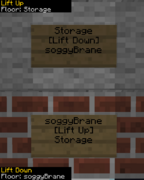
Signs can be wall mounted or placed on the floor, but they need to be on the same X and Z coordinates (obviously Y can be changed).
Angled brackets denote placeholders.
2nd line must be either [Lift Up] or [Lift Down].
Gates
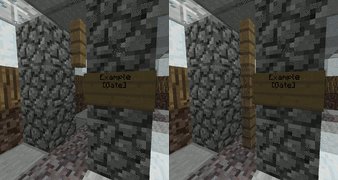
Fence gates that can be opened and closed.
Place a sign adjacent to a grid of fences with [Gate] in the 2nd line and you can add whatever you want (within reason) in the other lines.
You can do the same for the other side of the gate.
Bridges
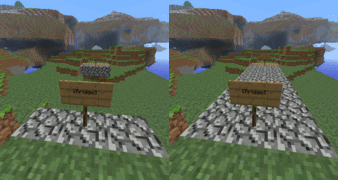
The bridge should be made out of one material and at the same elevation.
At the ends of the bridge, place a sign with [Bridge] in the 2nd line (same as gates).